Showing posts with label Yahoo. Show all posts

Monday, September 20, 2010

Download Application Yahoo! Mail V1.20(0) for Nokia 5800, N97, X6 and 5530

Yahoo! Mail V1.20(0) is here for your Symbian S60 5th edition based mobiles such as Nokia 5800 XpressMusic, N97, N97 Mini, X6, 5230, 5233, 5235 and 5530 XpressMusic. The application lets you launch Yahoo! Mail directly from the launcher icon inside Applications on your mobile.

Just click on Yahoo! Mail icon from your Applications folder and you will be able to login into your Yahoo! account. Now you don't need to go to internet--> Web --> Options --> Go to --> New web page to launch Yahoo! Mail. The version 1.20(0) of Yahoo! Mail is available to download from the following link.

Application Yahoo! Mail V1.20(0) for Nokia 5800 XpressMusic and N97 (19.6 KB)
Related Posts:

Friday, March 12, 2010

Download shMessenger - Facebook, Yahoo!, MSN and GTalk on Nokia 5800, N97

shMessenger Mobile is a Java based one of the best messenger client available for mobiles. The application supports Yahoo!, GTalk, MSN and Facebook. The application also works with Symbian S60 5th edition touch screen mobiles such as Nokia 5800 XpressMusic, N97, N97 Mini, X6, 5233, 5230, 5530 XpressMusic, Sony Ericssion Satio and Samsung i8910 Omnia HD.

The features of shMessenger application include-
  1. Smileys support
  2. Buddy Icons support
  3. Status Change
  4. Display Image Upload and Change
  5. Themes
  6. Sounds
  7. WAP and Internet Support
You can download both .jar and .jad files of shMessenger version 3.1.10 from the following links.

shMessenger.jar
shMessenger.jad


Related Posts:

Sunday, April 26, 2009

How to Configure Yahoo! Messenger in Nokia 5800 in-built IM application

Nokia 5800 XpressMusic device comes with an in-built IM application. In this post, i will explain the steps to configure this application to work with Yahoo! Messenger.

Step 1: Go to IM application and follow the instructions given in the following images.

IMIMIM

Step 2: Click on servers and define a new server as shown in the following images. Write imps.msg.yahoo.com in Server Name as well as in Web Address.

alt="IM"IMIM

Step 3: Define Access Point. Select from available access points as shown in following images.


Step 4: Fill your Yahoo! username and password as shown in the following image.

Yahoo IMYahoo IMYahoo IM

Now you are ready with Yahoo! Messenger on your Nokia 5800 XpressMusic. You will see all your friends and you can send messages to them.

Friend List
Limitations and Problems:
  • Only up to 30 friends are displayed. Can't add more than 30 contacts.
  • I was not able to send message from my PC messanger to mobile IM client. But i was able to receive messages from mobile IM client. I feel it's one way from mobile to PC, not the other way.

Related Posts:

How to Define Yahoo! Mail Box in Nokia 5800 XpressMusic

This is going to be a big image based post where I will take you through the steps required to setup Yahoo! mail box in your Nokia 5800 XpressMusic device. You can easily define Yahoo! mail box with the help of steps given in following images.

Step 1: Go to Messaging--> MailBox as shown in the following images.

MailBoxMailBox

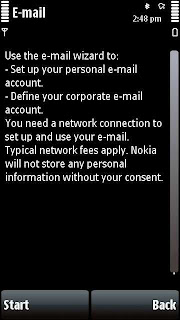
Step 2: Click on yes will take you to following screen. Click start to proceed.
Start
Step 3: Enter Email address and password as shown in following images.

EmaiPasswordPassword

Step 4: It will automatically define the Yahoo! mail box for you as shown in following images. Click ok when wizard is completed.

WizardDone

Step 5: As shown in following images, Click on connect to mailbox and wait for it to connect to Yahoo! server and update your mail box.

ConnectConnectUpdate

Now your mailbox is ready. You can check your mails from mailbox as shown in following images.

CompleteComplete

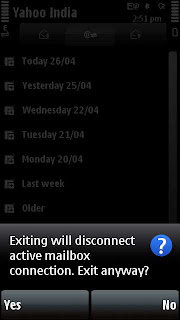
Enjoy Yahoo! mail on your Nokia 5800 XpressMusic. Press Exit and you are out of your mailbox.
Exit
If you found this article useful then please leave your comments or suggestions here to imrpove it further.


Related Posts: